Guest WiFi Captive Portal Behind CGNAT or Starlink
Plenty of venues get their internet from Starlink, a 4G or 5G router, or a rural broadband provider. Many of those connections share one public IP address between lots of customers, a setup called carrier-grade NAT, or CGNAT. It works fine for browsing, but it breaks anything that needs to reach your network from the internet.
That includes most external captive portals for UniFi.
Why CGNAT breaks most external portals
An external portal has to tell your UniFi console when a guest has signed in, so the console lets their device online. Most portal services do that by connecting to the console from the internet, which normally means forwarding a port on your router to it.
Behind CGNAT, your router doesn’t have its own public address. The address the internet sees belongs to your provider, and it’s shared with other customers, so there’s nothing for you to forward. Dynamic DNS doesn’t help either, because it only keeps track of an address you don’t control.
The usual workarounds are a business plan with a public IP address, which Starlink and some mobile providers offer for an extra cost, or running a tunnel or VPN from your network to a server elsewhere. Both work, and both are more for someone to pay for, set up and keep running.
How GuestGate gets round it
GuestGate never connects to your network from the internet. It talks to your console through UniFi’s official cloud connector, using an API key.
Your console already keeps its own connection open to UniFi’s cloud. That’s what lets you manage it from the UniFi app or unifi.ui.com wherever you are, even behind CGNAT, because the console made that connection outwards. GuestGate’s requests travel down the same connection.
So when a guest signs in, the sequence is:
- The guest’s phone joins your WiFi and loads your GuestGate login page from the internet.
- The guest fills it in and taps Connect.
- GuestGate asks UniFi’s cloud to authorise that device, and the request reaches your console over its existing connection.
- The console lets the guest online.
Nothing in that chain needs a public IP address or an open port on your network. UniFi captive portal without port forwarding goes into the connection in more detail.
What you still need to set up
Two things still happen on your side, both in UniFi Network, and neither needs anything opening on your router:
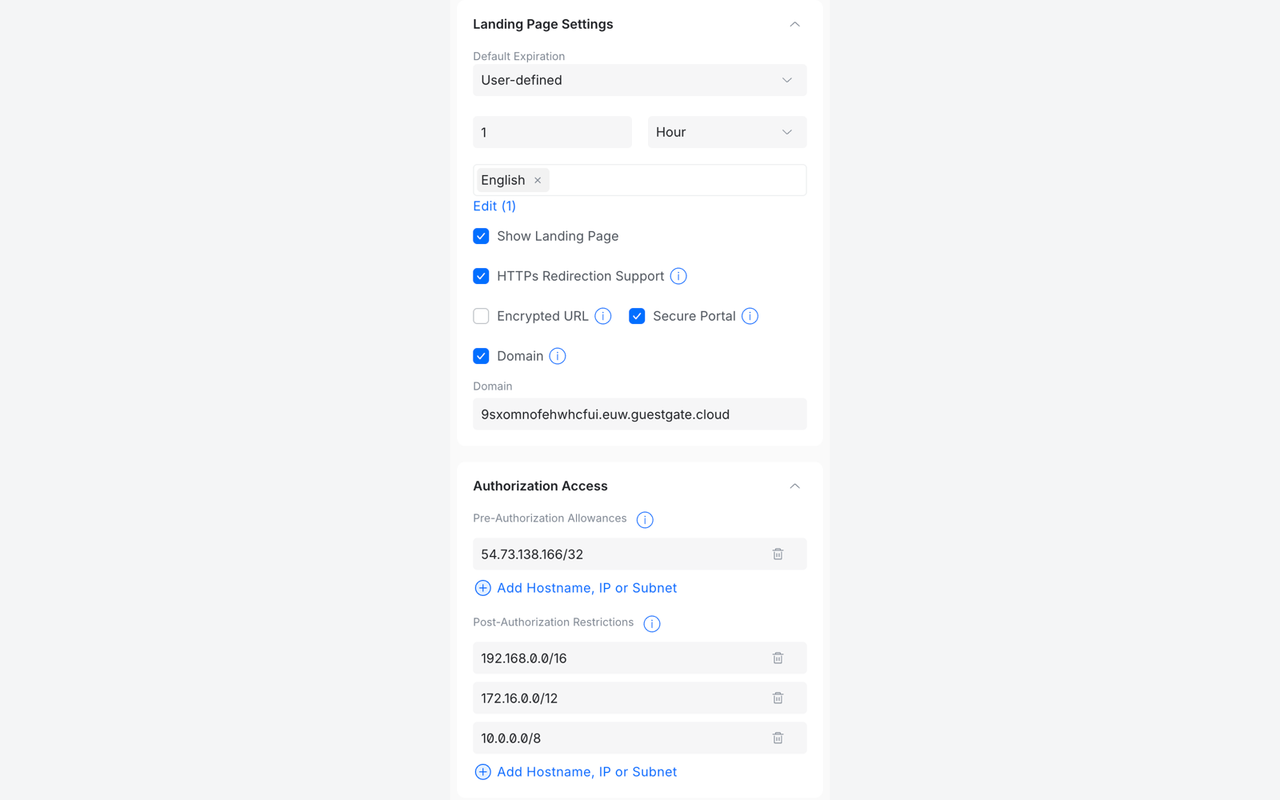
- Use GuestGate as the external portal. On the hotspot landing page, choose External Portal Server and enter GuestGate’s address, then tick Domain and enter your portal’s address.
- Let guests load the login page before they’re online. Add GuestGate’s address to the Pre-Authorization Allowances, so a guest’s phone can reach the page.
Set up the UniFi hotspot has the exact values, which are also on your portal’s page in GuestGate with a Copy button.
You’ll also need a console running UniFi OS 5.0.3 or later, on a UniFi account. Self-hosted UniFi Network servers can’t use the cloud connector.
Related guides
Try it
GuestGate has a 14-day free trial with every feature, and you don’t need a card to start. Create your account, paste a UniFi API key, and guests on your Starlink or 4G connection can be signing in today.